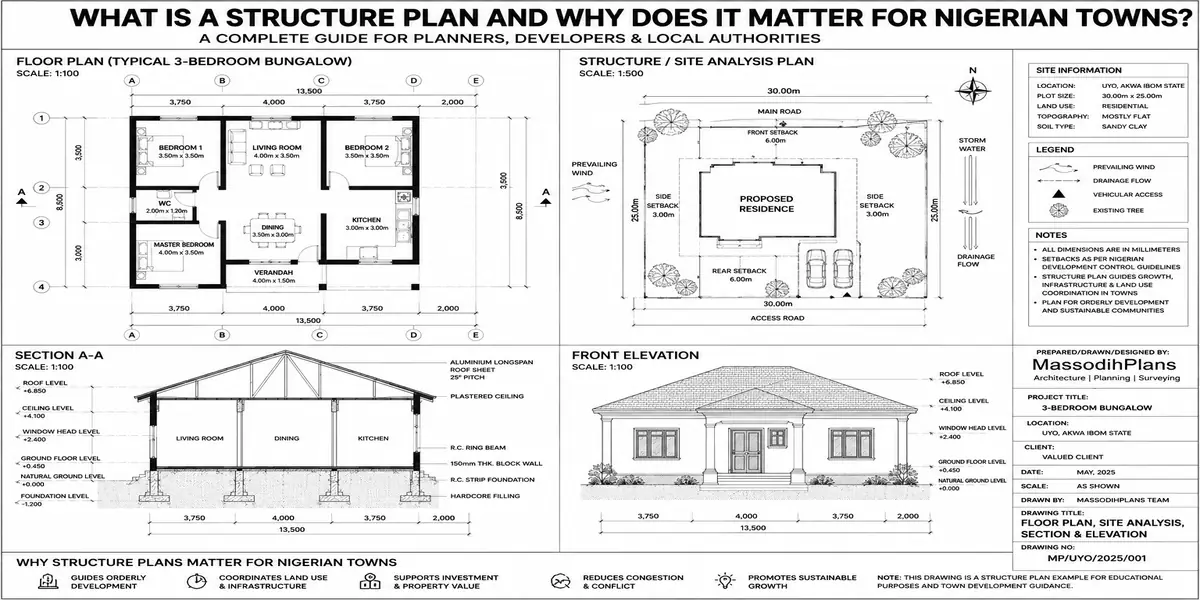
How Do I Use GIS for My Project? Small Plot Building Guide Nigeria
A client once sent me a photo of a plot in Uyo and asked one simple question: “Is this land good for building?” I hadn’t been there. I didn’t need to drive there. In about twenty minutes, sitting at my laptop, I’d pulled up the elevation, checked it against the nearest flood record, measured the slope across the plot, and confirmed the plot’s exact boundaries against the survey coordinates he sent me. That’s GIS. Not a university course, not an expensive software license just location data, read correctly, before a single block is laid.
That’s what this guide actually teaches you: not “what is GIS” in the abstract, but how to open the right tools, pull the right layers, and run the right numbers on your own plot before you spend money on land, a foundation, or a building plan that doesn’t fit your site. Whether you’re planning a small bungalow in Uyo, a duplex in Lekki, a cabin outside Reykjavik, or a townhouse in Toronto, the workflow below is the same only the data sources change by country, and we’ll cover those too.
What “Using GIS for My Project” Actually Means
Let’s be precise, because this phrase gets thrown around loosely. Using GIS for your project does not mean becoming a GIS analyst. It means using location-referenced data elevation, flood zones, soil type, zoning boundaries, satellite imagery to answer specific, practical questions about one piece of land: your plot.
Every one of those questions has a number attached to it, and that number should change a decision you’re about to make. That’s the test I apply to every GIS layer I pull for a client: if this data point doesn’t change what we build, where we build it, or how much we budget, it’s not worth the time. This guide only covers the layers that pass that test.
Before we go further, it’s worth being clear on what GIS actually is, since the term gets used loosely. Geographic Information Systems let us interpret data by understanding the relationships, patterns, and trends tied to specific locations on Earth’s surface which, for your project, simply means: data that tells you something true and specific about your plot, not land in general. gisgeography
The Core Question GIS Answers Before You Spend a Kobo (or a Dollar, a Dirham, a Franc)
Before land price, before architectural style, before anything else, every project should be able to answer one question with actual data: is this specific plot physically and legally safe to build on, and what does that mean for cost?
GIS answers this through four layers, in this order:
Elevation and slope does water run toward or away from this plot?
Flood and hydrology risk has this area flooded before, and how close is the plot to a known floodplain or drainage channel?
Soil and subsurface condition what foundation type will this site actually need?
Zoning and legal boundary is the plot’s shape, size, and location what the survey document says it is, and what can legally be built there?
Get these four answers before you commission a building plan, and you eliminate the majority of expensive surprises that show up mid-construction. Get them after, and you’re paying to fix a problem the data would have shown you for free.
If you only have time to check one GIS layer before buying land, check elevation and slope relative to the surrounding area. More foundation failures and flooding complaints I’ve handled trace back to this single overlooked factor than to any other site condition.
Step 1: Get Your Plot’s Exact Coordinates
Everything in GIS starts with coordinates, so this is non-negotiable groundwork. Your survey plan should already have this, usually in one of two formats:
Latitude/Longitude (decimal degrees) e.g., 5.0377° N, 7.9128° E for a plot in Uyo
UTM (Universal Transverse Mercator) a metre-based grid system used on most Nigerian survey plans, where Nigeria falls across UTM Zones 31N and 32N depending on location
If your survey plan only shows “beacon coordinates” in metres without a clear reference system, ask your surveyor to confirm the UTM zone and datum (Nigeria commonly uses Minna Datum or WGS84) mixing these up is a classic and completely avoidable source of boundary disputes.
Make I yarn you small for here: I don land sites where beacon pillar don “waka commot” the physical marker just vanish, nobody sabi where e go. Your neighbour go dey smile like say nothing happen, meanwhile na your boundary e don chop small small. That’s exactly why you confirm coordinates on a map, not just on ground markers that can move, be removed, or be “mistakenly” shifted.
Once you have coordinates, you can drop them directly into free tools like Google Earth Pro, QGIS, or your state’s GIS portal (covered below) and see your exact plot location against real satellite imagery not a hand-drawn sketch someone sold you.
Step 2: Check Elevation and Calculate Slope
This is where the numbers start, and it’s simpler than it sounds. Slope tells you how water moves across your plot, and it directly affects foundation design, drainage planning, and flood risk.
The slope formula:
Slope (%) = (Rise ÷ Run) × 100
Where Rise is the elevation difference between two points on your plot, and Run is the horizontal distance between those same two points.
Worked example: Say your plot is 30 metres deep, and GIS elevation data shows the front of the plot sits at 42 metres above sea level while the back sits at 43.5 metres.
Slope = (1.5 ÷ 30) × 100 = 5%
A 5% slope is generally manageable for standard residential construction with normal grading. Once slope exceeds roughly 10–15%, you’re looking at retaining walls, stepped foundations, or significant cut-and-fill work all of which add real cost that a flat-looking photo of the land will never show you.
If you want the angle instead of the percentage:
Slope angle (degrees) = arctan(Rise ÷ Run)
For our example: arctan(1.5 ÷ 30) = arctan(0.05) ≈ 2.86°
Free elevation data for this calculation is available through Google Earth Pro’s elevation profile tool, or through open elevation datasets like SRTM (Shuttle Radar Topography Mission), which covers virtually the entire planet, including rural plots in Akwa Ibom and farmland outside Christchurch alike.
Step 3: Assess Flood and Drainage Risk
Elevation on its own doesn’t tell you flood risk you need it in relation to the surrounding terrain and known water flow paths.
The basic flood-risk check:
If Plot Elevation < (Nearest Known Flood Level + Freeboard Allowance), flag the site as flood-exposed.
A typical freeboard allowance (a safety margin above the highest recorded flood level) used in Nigerian practice is 0.5 to 1 metre, though this should ideally be confirmed against your local planning authority’s specific guidance where available.
In practice, this means: pull up the historical flood extent for your area (many Nigerian states and most developed countries now publish flood hazard maps), overlay it against your plot’s elevation, and check the gap. If your plot sits only 0.3 metres above a flood level that’s been recorded nearby, that’s not a “maybe” that’s a site requiring raised foundations, serious drainage design, or reconsideration entirely.
A plot that has “never flooded” according to the current owner is not the same as a plot that GIS data confirms sits above historical flood levels. Memory and word-of-mouth are not data always check this against an actual elevation or flood hazard layer before relying on a seller’s assurance.
And since we’re on the subject of water: if your agent tells you the plot “never floods” with that confident smile, just know say na the same smile NEPA (sorry, “the power company”) dey give you anytime light go for one week the confidence no mean say the thing go actually happen as promised. Check the data, not the vibes.
Step 4: Confirm Soil and Subsurface Condition
GIS can point you toward likely soil conditions through regional geological and soil datasets, but it is not a substitute for an actual soil test on your specific plot treat it as a screening tool, not a final answer.
What GIS soil layers typically tell you:
- General soil classification for the area (sandy, clayey, laterite, alluvial)
- Proximity to known waterlogged, swampy, or reclaimed land zones
- Regional geological hazard data where available (seismic zones, subsidence-prone areas)
This matters directly for foundation cost. A plot flagged as sitting on sandy or waterlogged soil through regional GIS data should be budgeted for raft or pile foundation costs from the start not after a soil test confirms it mid-negotiation, when you’ve already committed to a budget built around a cheaper strip foundation.
Step 5: Calculate Buildable Area After Setbacks
Once you know the plot is physically sound, the next number you need is how much of it you can actually build on because your plot size and your buildable area are two very different figures.
The buildable footprint formula:
Buildable Width = Plot Width − (Left Setback + Right Setback)
Buildable Depth = Plot Depth − (Front Setback + Rear Setback)
Maximum Buildable Area = Buildable Width × Buildable Depth
Worked example: A 15m x 30m plot (450 sqm total) with 1.5m side setbacks and 3m front/rear setbacks:
Buildable Width = 15 − (1.5 + 1.5) = 12m
Buildable Depth = 30 − (3 + 3) = 24m
Maximum Buildable Area = 12 × 24 = 288 sqm
That’s a 36% reduction from the total plot size before you’ve even factored in plot coverage ratio limits, which many planning authorities cap separately (commonly 40–60% of the buildable area, depending on zoning). This is precisely why a “450 sqm plot” rarely means you can design a 450 sqm ground floor and it’s one of the most common and expensive misunderstandings I encounter with first-time clients.
Run this calculation before you commission a floor plan, not after. I’ve had clients fall in love with a design that simply does not fit their plot’s actual buildable area once setbacks are applied and redesigning after emotional attachment has formed is a harder conversation than running the numbers up front.
Step 6: Verify Irregular Plot Area (For Non-Rectangular Plots)
Not every plot is a clean rectangle, and GIS handles irregular shapes through a genuinely useful calculation called the Shoelace Formula, which calculates the area of any polygon from its corner coordinates.
The Shoelace Formula:
Area = |Σ(xᵢ × yᵢ₊₁ − xᵢ₊₁ × yᵢ)| ÷ 2
In plain terms: list your plot’s corner coordinates in order, multiply each point’s x-value by the next point’s y-value, subtract the reverse, sum all of those results, take the absolute value, and divide by two. Any free GIS software (QGIS is the standard free option) does this instantly once you’ve digitized your plot’s corners from your survey coordinates you don’t need to calculate it by hand, but knowing what the software is actually doing means you can sanity-check the result instead of blindly trusting a number on a screen.
This matters because irregular plots (common on corner lots and older subdivisions, in Nigeria and abroad alike) are frequently sold based on an approximate or rounded area rather than the true calculated area and that gap can mean you’re paying for square metres you don’t actually have, or missing buildable area you do.
A Comparison: Free vs. Paid GIS Tools for Your Own Project
| Tool | Cost | Best For | Limitation |
|---|---|---|---|
| Google Earth Pro | Free | Elevation profiles, satellite imagery, basic measurement | Limited analysis depth, no true spatial database |
| QGIS | Free, open-source | Full spatial analysis, area/slope calculation, data overlay | Steeper learning curve than Google Earth |
| State/National GIS Portals | Free (where available) | Official zoning, flood, and boundary data | Coverage and data quality varies significantly by country/state |
| ArcGIS Online | Freemium/Paid | Professional-grade analysis, cloud collaboration | Paid tiers needed for serious project use |
| Drone + Photogrammetry Software | Paid | High-resolution, site-specific elevation and contour mapping | Requires equipment or hired service; overkill for most single-plot projects |
For a single residential plot, Google Earth Pro plus your relevant state/national GIS portal covers roughly 80% of what you actually need, at zero cost. QGIS becomes worthwhile once you want to run your own calculations (like the Shoelace Formula above) rather than eyeballing them.
Free GIS and Mapping Data Sources by Country
Because readers of this guide plan projects well beyond Nigeria, here’s where to actually pull this data depending on where you’re building:
| Country/Region | Where to Start |
|---|---|
| Nigeria | NGSA (Nigerian Geological Survey Agency), state Ministries of Lands/Physical Planning GIS units, OpenStreetMap Nigeria |
| United States | USGS National Map, FEMA Flood Map Service Center, county GIS/assessor portals |
| United Kingdom | Ordnance Survey (OS) data, Environment Agency flood maps, local council planning portals |
| Germany | Geoportal.de, state-level LGLN/Landesvermessung offices |
| UAE | Dubai Municipality GIS portal, local emirate land department portals |
| Iceland | Landmælingar Íslands (National Land Survey of Iceland) |
| Luxembourg | Geoportail Luxembourg |
| Switzerland | map.geo.admin.ch (Swiss national geoportal) |
| Qatar | Ministry of Municipality GIS services |
| Canada | Natural Resources Canada Geospatial Data, provincial/municipal open data portals |
| Australia | Geoscience Australia, state land information systems (e.g., NSW SIX Maps) |
| Singapore | OneMap (Singapore Land Authority) |
Wherever you’re building, the same four-layer workflow applies: coordinates, elevation/slope, flood/soil risk, and buildable area after setbacks. Only the name of the portal changes.
A Small-Plot Case Study: Putting It Together
Let’s run the full workflow on a realistic 400 sqm plot in Uyo, the kind of small urban infill plot most of our clients actually work with.
Coordinates confirmed from the survey plan against Minna Datum, cross-checked in Google Earth Pro plot location matches the physical beacon positions
Elevation check shows a gentle 3% slope from the rear to the front boundary mild, manageable with standard grading, draining toward the access road as intended
Flood risk plot elevation sits 1.2m above the nearest recorded flood extent along a seasonal drainage channel 200m away acceptable margin, no special flood design required
Soil regional data flags the area as predominantly sandy-loam, consistent with standard strip foundation suitability, confirmed afterward by an actual soil test before design finalization
Setbacks applied a 400 sqm (16m x 25m) plot with 1.5m side and 3m front/rear setbacks gives a maximum buildable footprint of 13m x 19m = 247 sqm, guiding the floor plan brief given to the architect from day one, instead of after a design had to be redrawn
That’s the entire difference between a project that starts with data and a project that starts with guesswork and gets expensive surprises later.
Common GIS Mistakes People Make on Their Own Projects
Trusting a seller’s verbal flood history over actual elevation/flood data word of mouth is not a dataset
Skipping the UTM zone/datum check, leading to boundary coordinates that don’t actually match the physical plot
Designing a floor plan based on total plot size instead of buildable area after setbacks the single most common and costly oversight I see
Treating regional soil GIS data as a substitute for an actual site-specific soil test, rather than as a screening step before one
Ignoring slope direction entirely knowing there’s a slope matters less than knowing which way it drains, relative to your building and your neighbours’
And speaking of neighbours if your plot’s “slope” turns out to be draining straight into your neighbour’s compound, just know say that na free “landlord-tenant” wahala you don create for yourself, and no amount of smiling and greeting “good morning sir” every day go solve am once the rainy season reach. Check the drainage direction before you build, not after the first flood.
Frequently Asked Questions
Do I need to be a GIS expert to use this for my own project?
No. You need to know what four or five specific layers to check (elevation, flood risk, soil, zoning, buildable area) and how to read the numbers they produce. The tools covered here (Google Earth Pro, free state/national GIS portals, QGIS for deeper analysis) are built for non-specialists to use directly.
Is free GIS data accurate enough to make real decisions, or do I need to pay for professional data?
Free data (SRTM elevation, national geoportals, Google Earth Pro) is reliable enough for initial screening and early decision-making on a single residential plot. For final engineering decisions foundation design specifically always confirm with an actual site soil test and survey, not GIS data alone.
What’s the single most useful GIS check before buying land?
Elevation and slope relative to the surrounding terrain, cross-checked against any known flood history nearby. This one check prevents more expensive post-purchase surprises than any other single data layer.
Can GIS tell me exactly what foundation type I need?
No it can flag likely soil conditions and flood exposure that point toward a foundation type, but an actual soil test remains essential before finalizing foundation design. Treat GIS as the screening step, not the final engineering answer.
Does this workflow work outside Nigeria?
Yes, the four-layer workflow (coordinates, elevation/slope, flood/soil risk, buildable area) is universal. Only the specific data portal you pull from changes by country, as shown in the table above.
Conclusion
Using GIS for your project isn’t about mastering complicated software it’s about asking your land four specific, numbered questions before you commit money to it: what’s the slope, what’s the flood risk, what’s the soil likely to need, and how much of this plot can I actually build on. Answer those with real data, in that order, and you’ve already avoided the majority of the expensive surprises that turn a straightforward small-plot project into a budget nightmare.
If you’re working through this on your own plot and want it checked properly before you commission a design, our Services page outlines how we support clients with site analysis alongside architectural work. Browse our Plans Library for house plans already designed around realistic small-plot buildable areas, or visit Plan School to understand how setbacks, zoning, and site data feed into the design and approval process. You can also explore more planning and building guides on our Homepage.
- How Do I Determine Service Areas With GIS? Find Coverage Gaps Fast
- How Much of My Land Can I Build On? Plot Coverage Guide Nigeria
- What Setbacks Do I Need? Small Plot Setback Rules in Nigeria Explained
- How Long Does Planning Approval Take? Nigeria Approval Timelines Guide
- How Much Does Planning Permission Cost? Nigeria Fees & Approval Guide
Authors
Massodih Okon is a Nigerian built-environment professional with academic and professional experience in urban and regional planning, geography, architectural design, Landscape Design, GIS and land development.
He holds a Master’s degree in Urban and Regional Planning from the University of Uyo and a first degree in Geography and Regional Planning.
Through MassodihPlans, he publishes practical guides on Nigerian house plans, building design, physical planning, site planning, development approval and residential construction. Read the full author profile →