How Do I Determine Service Areas With GIS?
A client once sent me coordinates for a plot he’d bought in Uyo without visiting it, asking me to confirm “if the place is good.” Good for what, I asked him. He didn’t know. He just knew the agent said it was “close to everything.” That single word close is exactly what service area analysis in GIS was built to answer honestly, because “close” on a map and “close” on the ground are frequently two very different distances.
I’m going to answer the question you actually searched how do you determine a service area with GIS the way I’d explain it to a planning student in a lecture hall, a client trying to vet a plot before paying for it, and a fellow practitioner comparing notes. Then I’m going to connect it to something almost no GIS tutorial bothers with: what this analysis actually means for someone planning a house on a small plot, whether that plot is in Uyo, Lekki, London, or Luxembourg.
What a Service Area Actually Is
A service area is the geographic zone from which a facility a hospital, school, fire station, market, water scheme, or even a single house’s access point can realistically be reached within a defined limit. That limit is called the impedance, and it’s usually expressed as distance, travel time, or cost.
The critical word in that definition is “realistically.” A service area is not a neat circle drawn around a point. It is shaped by the actual network roads, footpaths, rivers, one-way systems that people and vehicles have to use to get there. This is the single most important distinction in the entire topic, and it’s where most beginners (and a surprising number of professionals in a hurry) get it wrong.
Buffer Analysis vs. Network Service Area: The Distinction That Changes Everything
Here’s the comparison that should anchor everything else in this guide:
| Feature | Buffer Analysis | Network Service Area |
|---|---|---|
| Measures distance as | Straight line (“as the crow flies”) | Actual path along roads/network |
| Shape produced | Perfect circle (or ring) | Irregular polygon following the road layout |
| Accounts for rivers, one-ways, dead ends | No | Yes |
| Computation | Simple: A = πr² | Requires a routable network dataset |
| Best used for | Quick first-pass screening | Real accessibility decisions |
| Risk if used alone | Overstates real accessibility | None this is the honest answer |
A buffer analysis around a proposed clinic might show a 5 km circle covering 20,000 people on paper. But if a river with no bridge for 3 km cuts straight through that circle, half those people cannot actually reach the clinic within 5 km of real travel they’re reaching it at 9 or 10 km once you follow the only available crossing. The network service area shows you that irregular, river-respecting shape. The buffer lies to you politely. The network tells you the truth.
Always run a buffer first it’s fast and gives you a rough feel for the area. Then run the network service area before you make any real decision. If the two shapes look nearly identical, your road network in that area is dense and well-connected. If they look very different, that gap is telling you something important about the terrain or infrastructure you’re about to build or buy into.
The Core Formulas Behind Service Area Analysis
Most articles on this topic show you software buttons and skip the mathematics entirely. Understanding the actual formulas is what lets you sanity-check any GIS output instead of trusting it blindly.
1. The Euclidean Buffer Area
For a simple straight-line buffer of radius r:
A = πr²
A 2 km buffer gives you A = π(2)² = 12.57 km². This is your baseline, upper-limit estimate the network service area will always be equal to or smaller than this number, never larger.
2. Distance-Time-Speed Relationship (for setting your impedance)
Before you can set a meaningful travel-time limit, you need a realistic speed assumption for the mode of travel:
Distance = Speed × Time
For example, walking at an average of 5 km/h for 15 minutes (0.25 hours):
Distance = 5 × 0.25 = 1.25 km
For urban driving at a conservative 30 km/h for 10 minutes (0.167 hours):
Distance = 30 × 0.167 = 5 km
This is why “10 minutes by car” and “10-minute walk” produce completely different service area sizes a mistake I see constantly in Nigerian estate marketing material, where “10 minutes to the express road” is quietly measured in a car doing 60 km/h, not the actual traffic-choked crawl you’ll experience at 7 a.m.
3. Estimated Population Served
Once you have your service area’s actual size (from the network analysis, not the buffer), you can estimate how many people it serves:
Population Served = Service Area (km²) × Population Density (persons/km²)
If your network service area works out to 8.4 km² in a zone with a density of 3,500 persons/km²:
Population Served = 8.4 × 3,500 = 29,400 persons
4. Service Area Efficiency Ratio (how to judge your road network’s honesty)
This is a figure I use personally and rarely see named elsewhere, so I’ll give it a name here: the Service Area Efficiency Ratio (SER) the proportion of the theoretical buffer that the real network actually delivers.
SER = Network Service Area ÷ Euclidean Buffer Area
A SER close to 1.0 (say, 0.85–0.95) means the road network in that zone is dense and well-connected nearly every part of the circle is genuinely reachable. A SER below 0.5 is a red flag: it means less than half of what looks reachable on a simple map is actually reachable on the ground, usually because of rivers, swampland, gated layouts with single entry points, or genuinely poor road density. For anyone vetting a plot before buying, this single ratio tells you more honestly how “connected” that location really is than any agent’s description ever will.
5. The Huff Gravity Model (for overlapping service areas)
When two or more facilities’ service areas overlap two markets, two schools, two clinics the Huff Model estimates what proportion of demand each one actually captures, based on size and distance:
Pᵢⱼ = (Sⱼ / Dᵢⱼ^λ) ÷ Σ(Sₖ / Dᵢₖ^λ)
Where Sⱼ is the size/attractiveness of facility j, Dᵢⱼ is the distance from point i to facility j, and λ is a distance-decay exponent (commonly set around 2). In plain terms: bigger, closer facilities capture a larger share of nearby demand, and the model lets you quantify exactly how much.
Transitioning from theory into practice because formulas alone don’t vet a plot let’s walk through the actual steps a GIS professional follows to produce a service area, and then what you, without GIS software, can still extract from the same logic.
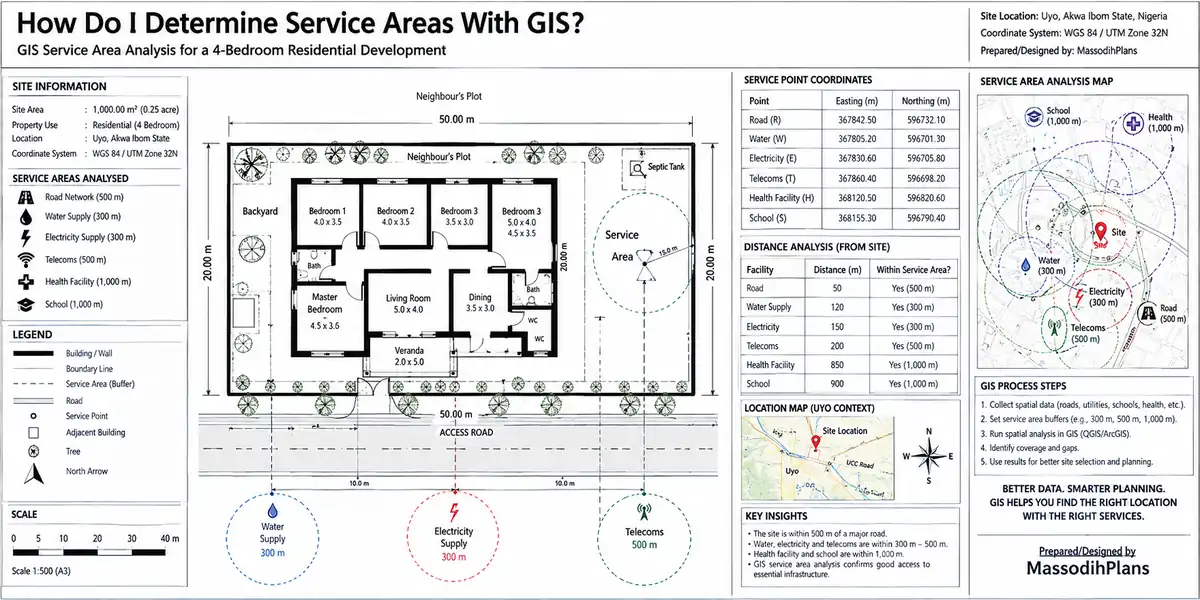
Step-by-Step: How a GIS Professional Determines a Service Area
Define the facility point(s) the exact coordinate of the hospital, school, market, or plot in question
Choose your network dataset a routable road/path layer (OpenStreetMap extracts are genuinely usable for this, not just commercial datasets)
Set your impedance type and value distance (km), time (minutes), or a custom cost attribute
Assign direction rules one-way streets, no-entry junctions, and restricted turns must be encoded correctly or your polygon will be wrong in exactly the places that matter most
Run the solve in ArcGIS Network Analyst, QGIS (with the QNEAT3 plugin), or open-source routing engines like pgRouting
Generate concentric breaks most real analyses don’t stop at one limit; they show 5, 10, and 15-minute rings (or similar), because accessibility is rarely a single hard line
Overlay demographic or demand data population, housing density, or customer location points to translate the polygon into a number of people actually served
Validate against ground truth this step is skipped more often than any other, and it’s the one that catches outdated road data, newly closed bridges, or a new estate gate that blocks a road the dataset still thinks is open
Free routing datasets go stale. A road that was open when the dataset was last updated may now be blocked by a new private estate gate, a collapsed bridge, or a diverted drainage channel all common occurrences across Nigerian urban growth areas. Never trust a service area polygon without at least one physical or satellite-imagery verification of the key routes it depends on.
The Joke Break Every Lecture Hall Needs Here
Before we move into why any of this matters for someone building a small-plot house rather than running a hospital network, let me rest your brain the way I rest my students’ because by this point in the lecture, somebody is always nodding off.
One agent wey dey sell plot for one swampy area tell my client say “the place dey 5 minutes from market.” My client believe am, buy the land. The day he waka go market, na 45 minutes rough bush path he trek, almost enter one small river wey no get bridge. When I show am network analysis, I tell am: “Oga, the agent measure am with helicopter, you waka am with leg.” That one na why we dey use network service area, not straight-line buffer because road no be bird wey fit fly cross river.
Why This Matters If You’re Just Building One Small House, Not a Hospital
Everything above sounds like it belongs to city planners managing hundreds of facilities. It belongs to you too, at a much smaller and more personal scale, the moment you’re choosing or evaluating a small plot.
Before MassodihPlans is anything else, it exists to solve one problem: helping people design and build well on small, often irregular plots the kind of land most first-time Nigerian homeowners and diaspora buyers can actually afford, rather than the sprawling acreage shown in foreign house-plan catalogues. Service area thinking is one of the most underused tools for that exact problem, because the house plan is only ever as good as the plot’s real accessibility, and most buyers never check that properly before committing money.
The Plot Accessibility Checklist (Service-Area Thinking Without Software)
You don’t need ArcGIS to apply this logic. You need these questions, answered honestly, for any plot you’re considering:
- What is the actual road-following distance (not straight-line) to the nearest tarred access road?
- What is the realistic drive time to the nearest hospital, during normal traffic, not 2 a.m.?
- Is there more than one route in and out, or does the whole area depend on a single access road that floods or gets gated shut?
- What is the walking distance, along the actual path, to the nearest market or transport stop?
- Does the plot sit inside or outside the practical service area of the nearest fire service a detail insurers and some diaspora buyers increasingly ask about directly?
When evaluating a plot for a client, I personally trace the route on Google Maps or satellite imagery, not just the straight-line distance the agent quotes. If the agent’s “5 minutes” turns into 20 minutes of actual road-following distance, that gap tells me more about the plot’s real value than the agent’s sales pitch ever will.
A Worked Small-Plot Example
Let’s put real numbers to this, the way I would for a client sitting across from me.
A client is considering a 450 sqm plot. The nearest primary school is 1.4 km away by straight-line buffer, but the only road access loops around a drainage channel, making the real network distance 2.6 km.
Service Area Efficiency Ratio for this access route:
SER = 2.6 ÷ 1.4 = 1.86 — meaning the real distance is 86% longer than the straight-line distance suggests. (Note: SER can exceed 1 when measuring a single route’s detour factor rather than comparing full buffer-vs-network areas both uses are valid, as long as you’re consistent about which comparison you’re making.)
At an average child’s walking speed of roughly 4 km/h, that 2.6 km translates to:
Time = Distance ÷ Speed = 2.6 ÷ 4 = 0.65 hours ≈ 39 minutes, each way.
That’s the number that actually matters for a family deciding whether this plot suits a household with young children not the agent’s “it’s close to a school” sales line.
Service Area Standards: What “Well-Served” Actually Means
Different facility types have different accepted service radii, and knowing these benchmarks lets you judge any plot or neighbourhood objectively rather than by agent enthusiasm:
| Facility Type | Typical Walking Service Radius | Typical Driving Service Radius |
|---|---|---|
| Primary school | 0.8 – 1.5 km | N/A (should be walkable) |
| Local market/shop | 0.5 – 1 km | 2 – 5 km |
| Primary health centre | 1 – 2 km | 5 km |
| General hospital | N/A | 8 – 15 km / 20–30 min |
| Fire station | N/A | 5 – 8 km / 8–10 min response |
| Public water point | 0.2 – 0.5 km | N/A |
These are planning-standard ranges, not legal guarantees but they give you a benchmark to measure any plot against instead of relying on an agent’s unverifiable claim.
Software Options: Picking Your Tool Honestly
| Tool | Cost | Best For |
|---|---|---|
| ArcGIS Pro + Network Analyst | Paid (licensed) | Professional consultancy work, complex multi-facility analysis |
| QGIS + QNEAT3 plugin | Free, open-source | Students, small practices, and anyone verifying a single plot |
| Google Maps (manual route tracing) | Free | Individual buyers with no GIS background at all |
| pgRouting (PostgreSQL) | Free, open-source | Developers building custom accessibility tools or apps |
You genuinely do not need paid software to apply the core logic of this article to one plot decision. QGIS with free OpenStreetMap data, or even patient manual route-tracing on Google Maps, gets you 80% of the real-world insight a full ArcGIS license would.
Carrying this logic beyond Nigeria because service area thinking isn’t a Nigerian concept, it’s how planning authorities worldwide decide what “accessible” legally means, and the specifics shift from country to country.
Service Area Thinking Around the World
If you’re reading this from outside Nigeria while planning a build, a plot purchase, or just understanding how your own neighbourhood was planned, the underlying method is identical only the standards and the data infrastructure differ:
United States: Service area analysis underpins Federal Emergency Management Agency (FEMA) response planning and school district zoning; county GIS portals often publish network-based service areas publicly
United Kingdom: Used extensively in NHS catchment planning and local authority “walkable neighbourhood” policy, often built on Ordnance Survey network data
Germany: Integrated into Bauleitplanung (urban land-use planning) for assessing Erreichbarkeit (accessibility) of schools, transit, and healthcare before zoning approval
UAE: Dubai Municipality and Abu Dhabi’s Department of Municipalities use network service areas in 15-minute-city and neighbourhood planning frameworks
Canada & Australia: Widely used at municipal level for fire and emergency response coverage mapping, often with public-facing GIS dashboards
Switzerland, Luxembourg, Iceland: Smaller, data-rich countries where high-resolution network datasets make this kind of analysis unusually precise, often used in public transit planning
Singapore & Qatar: Centralized national GIS infrastructure makes service area standards a formal part of urban masterplanning, particularly around MRT/transit nodes and new development zones
Wherever you’re building, the principle holds: don’t trust a straight-line claim of proximity, whether it comes from a Lagos land agent or a glossy foreign property brochure. Verify the network distance.
Common Mistakes in Determining Service Areas
Using buffer distance alone and presenting it as real accessibility the single most frequent error, covered at length above
Ignoring directionality one-way streets and restricted turns silently distort results if not encoded
Using outdated network data without ground-truthing against current satellite imagery
Applying one speed assumption to all modes walking, driving, and motorcycle/okada travel in Nigerian contexts have genuinely different realistic speeds, and conflating them produces misleading time-based service areas
Forgetting seasonal variation a route that’s a 10-minute drive in dry season can become impassable or significantly longer in heavy rains, a factor rarely built into standard GIS service area models but essential in Nigerian site assessment
Frequently Asked Questions
What is the difference between a buffer and a service area in GIS?
A buffer is a straight-line distance measurement that produces a perfect circle. A service area follows the actual road or path network, producing an irregular polygon that reflects real-world accessibility rivers, one-ways, and dead ends included.
What software do I need to determine a service area?
Professionally, ArcGIS Network Analyst or QGIS with the QNEAT3 plugin. For a single personal plot decision, even careful manual route-tracing on Google Maps applies the same underlying logic without needing any GIS software at all.
How do I calculate the population served by a facility?
Multiply the network service area’s actual size in square kilometres by the population density of that zone: Population Served = Area × Density.
Why does my buffer area look bigger than my network service area?
Because a buffer measures straight-line distance in every direction equally, while a network service area is constrained by the real routes available it can never exceed the buffer area, only match or fall short of it.
Can I use service area analysis to evaluate a single house plot before buying it?
Yes this is exactly the practical application covered in this guide. Apply the same network-distance logic to the plot’s access to schools, markets, hospitals, and main roads instead of trusting an agent’s straight-line “it’s close” claim.
Finally
Determining a service area with GIS isn’t really about mastering software menus it’s about refusing to accept a straight-line claim of “close” without checking whether the actual network agrees. Whether you’re a planning student working through your first network analysis assignment, a consultant mapping hospital coverage, or a client about to pay for a small plot based on an agent’s word, the same question applies: is this distance measured on a map, or on the ground people actually have to walk and drive?
If you’re evaluating a plot for your own small-plot build, our Services page covers how we assist clients with site assessment before design begins, and our Plan School walks through how access and layout decisions shape a workable house plan on a small site. Browse our Plans Library for designs already built around realistic small-plot access and orientation, and explore more planning and GIS guides on our Homepage.
- How Much of My Land Can I Build On? Plot Coverage Guide Nigeria
- What Setbacks Do I Need? Small Plot Setback Rules in Nigeria Explained
- How Long Does Planning Approval Take? Nigeria Approval Timelines Guide
- How Much Does Planning Permission Cost? Nigeria Fees & Approval Guide
- Why Was My Planning Application Rejected? Reasons and How to Fix It
- How Do I Do GIS Analysis for My Thesis? A Real Step-by-Step Guide
Author
Massodih Okon is a Nigerian built-environment professional with academic and professional experience in urban and regional planning, geography, architectural design, Landscape Design, GIS and land development.
He holds a Master’s degree in Urban and Regional Planning from the University of Uyo and a first degree in Geography and Regional Planning.
Through MassodihPlans, he publishes practical guides on Nigerian house plans, building design, physical planning, site planning, development approval and residential construction. Read the full author profile →