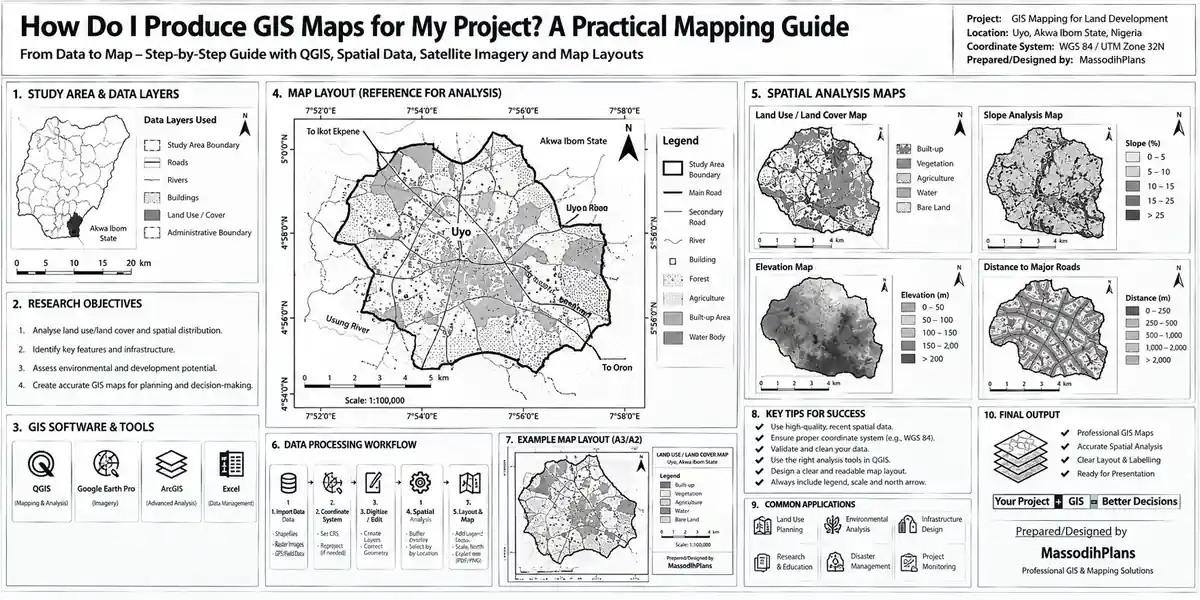
How Do I Produce GIS Maps for My Project? A Practical Mapping Guide
Let me tell you about a call I got from a client in Houston two years ago. He had bought land back home through an agent, the agent sent him a “survey plan,” and he was ready to start building. One question stopped the whole project: “Massodih, how do I even know this land isn’t sitting inside a flood channel?” He had the paperwork. He didn’t have the picture. That’s the gap GIS mapping closes, and it’s the reason this article exists not as a software tutorial, but as the answer to a question that comes up constantly from people planning to build: how do you actually produce a map that tells you the truth about a piece of land before you commit money to it?
If you’ve landed here searching “how do I produce GIS maps for my project,” you’re probably in one of a few situations a student trying to finish a planning assignment, a self-builder trying to understand your site before an architect draws anything, or a diaspora client trying to verify land from thousands of kilometres away. This article is written for all three, in plain language, with zero assumption that you already own expensive software or have a GIS background.
First, Let’s Clear Up What a “GIS Map” Actually Is
A lot of confusion starts here, so let’s settle it before anything else.
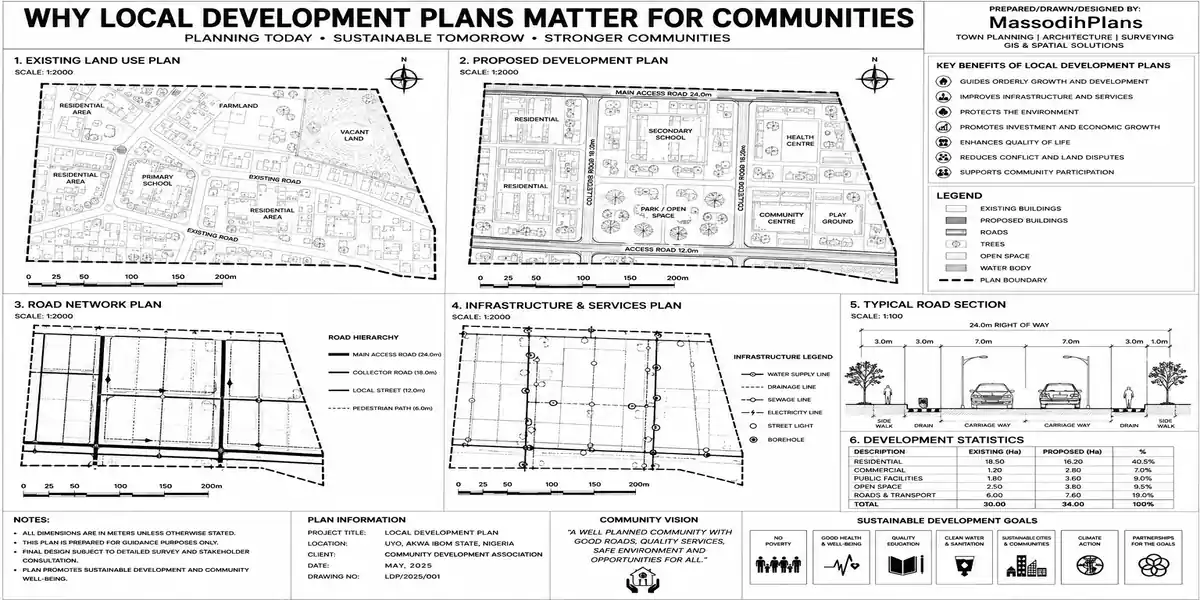
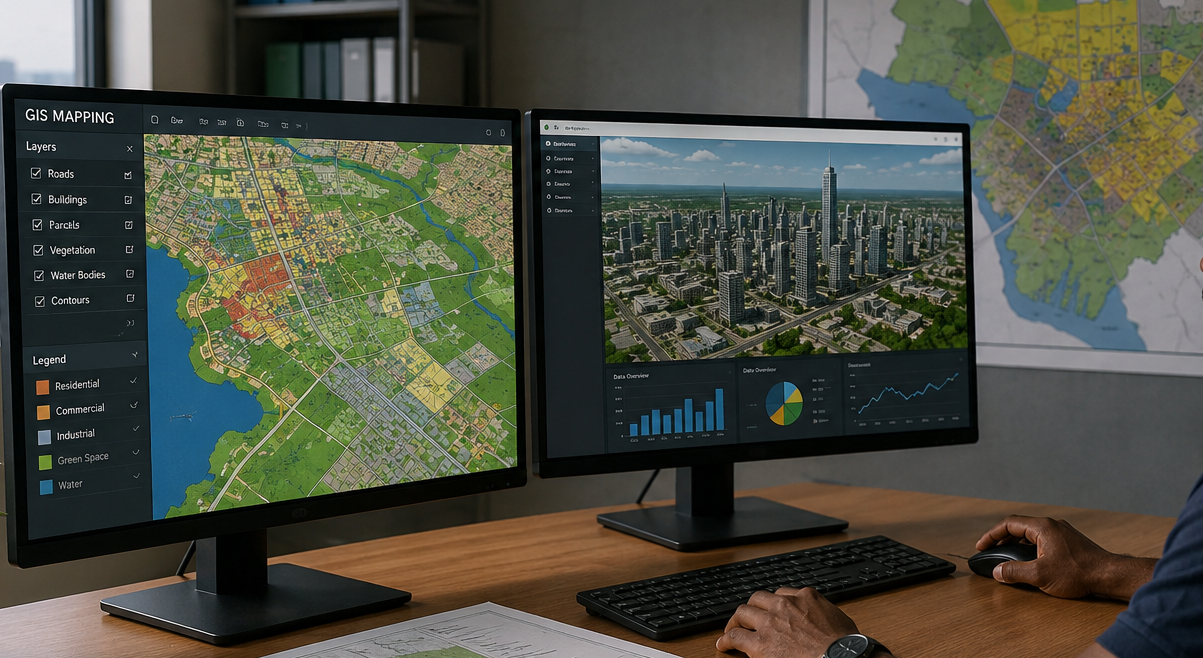
A GIS map (Geographic Information System map) is a map built from layers of real-world data satellite imagery, elevation data, boundary coordinates, land use classification, flood zones, road networks stacked on top of each other and tied to actual geographic coordinates. It’s not a drawing. It’s data you can query, measure, and analyze.
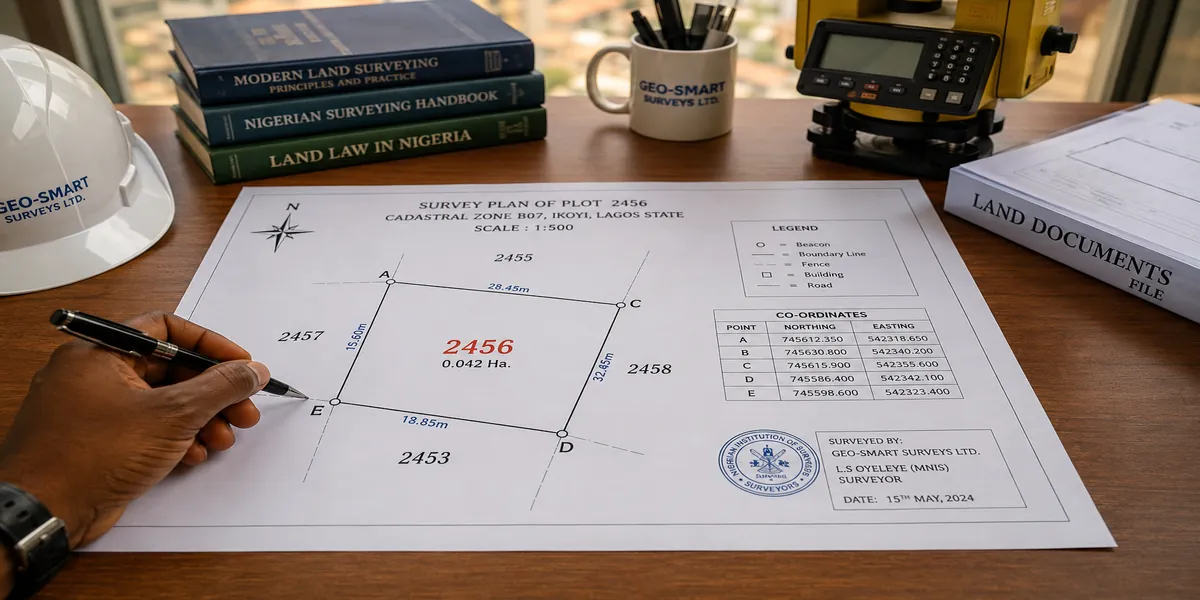
A survey plan is a legal document prepared by a licensed surveyor showing your plot’s exact boundaries, beacons, and coordinates, registered with the relevant land authority.
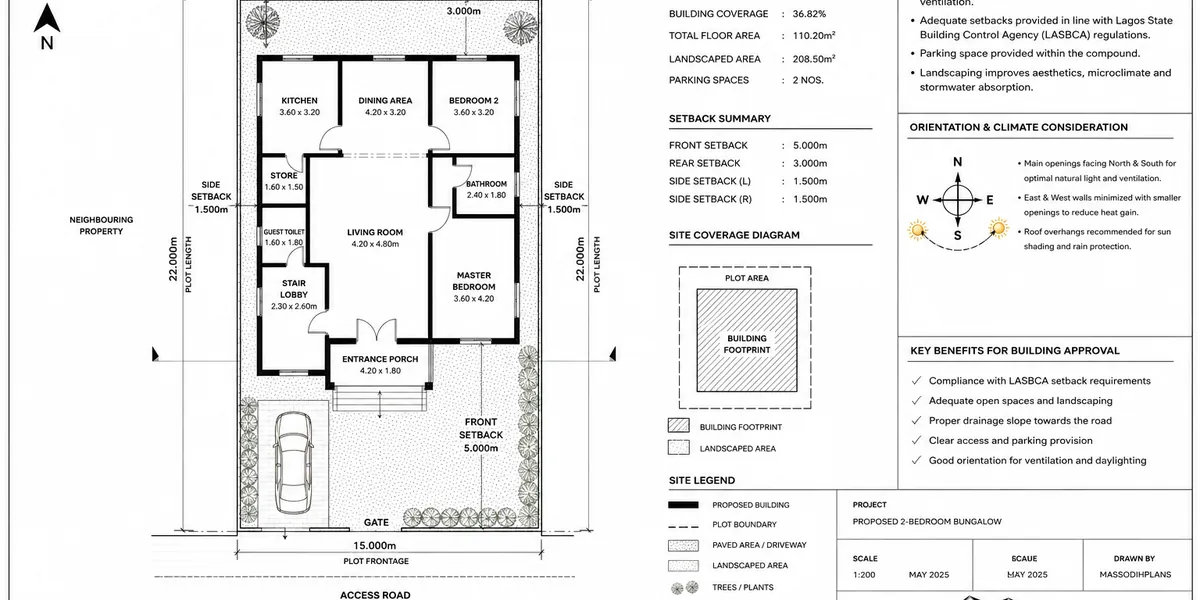
A site plan (in the architectural sense) shows your proposed building’s position on the plot, relative to boundaries and setbacks.
Here’s the relationship: your survey plan gives you the coordinates. A GIS map lets you place those coordinates inside real-world context elevation, drainage, flood risk, surrounding land use that your survey plan alone cannot show you. They work together; one doesn’t replace the other.
If anyone tries to sell you a “GIS map” as a replacement for your survey plan, that’s a red flag. A GIS map adds context around your boundaries. It does not establish legal ownership or boundary accuracy only a registered surveyor’s plan does that.
Why You, Specifically, Might Need One
This isn’t a theoretical exercise. Here are the real situations where producing a GIS map for your project actually solves a problem:
You’re buying land you haven’t physically inspected (common with diaspora clients) and need to verify it isn’t in a flood-prone or wetland area before paying
You’re planning a building on a small or irregular plot and need to understand the slope, drainage direction, and surrounding context to design the foundation and layout correctly
You’re preparing documentation for building approval, and your state or local planning authority requires spatial data showing your plot in relation to zoning, setbacks, or environmental constraints
You’re comparing multiple plots before purchase and want an objective way to evaluate elevation, access, and flood risk side by side
You’re a student or junior planner who needs to actually produce a map for an assignment or portfolio, not just read about the theory
Now, transitioning from the “why” into the “how” because understanding the reason this matters is only half the job. The other half is actually sitting down and producing one yourself, which is where most online tutorials either overcomplicate things with enterprise software or skip the Nigerian/global-plot reality entirely.
What You Actually Need Before You Open Any Software
Before touching any tool, gather these four things. Skipping this step is the single biggest reason people get stuck halfway through a GIS mapping attempt.
Your plot’s coordinates from your survey plan (beacon coordinates), or at minimum the latitude/longitude of the general location
A clear goal are you checking flood risk, mapping topography for foundation design, verifying land use zoning, or all three? Your goal determines which data layers you need
Internet access with a reasonable connection satellite imagery and elevation data files can be sizeable downloads
Patience for your first attempt your first GIS map will take longer than you expect; by your third or fourth, it’s routine
I say this because I’ve watched clients download QGIS, open it, stare at a blank screen, and give up in ten minutes because nobody told them step one is actually gathering your data, not opening the software.
Free satellite imagery resolution varies by location. Many parts of Nigeria and other developing regions have lower-resolution free imagery than, say, central London or Dubai. If your free imagery is too blurry to make out your plot clearly, that’s normal it’s a resolution limitation, not something you’re doing wrong, and we’ll cover what to do about it below.
The Free Tools That Actually Get This Done
You do not need enterprise software to produce a usable GIS map for a building project. Here’s what I actually recommend, in order of how most self-builders and students should approach it:
QGIS (free, open-source) this is your main GIS software. It does everything ArcGIS does for this purpose, at zero cost, and it’s what I recommend to every student and client who asks
Google Earth Pro (free) excellent for a quick visual check of a plot and surrounding terrain before committing to full GIS work
OpenStreetMap (free) a solid source for roads, buildings, and land use data in most regions, including reasonably good coverage across Nigerian cities
SRTM elevation data (free, via USGS EarthExplorer or OpenTopography) this gives you terrain elevation, which is how you build topographic/contour layers to understand slope and drainage on your plot
Sentinel/Landsat satellite imagery (free, via Copernicus Open Access Hub or USGS EarthExplorer) higher-resolution and more current imagery than some default basemaps
Notice something: every single tool on that list is free. If someone quotes you a six-figure naira sum for “GIS software access” to produce a basic site map, they are either padding their fee or confusing you with enterprise-scale mapping work you don’t actually need for a residential plot.
Now, here’s the first joke, because if you’re in my lecture hall right now, I’d be cracking this exact one at this exact point: You know that “GIS expert” wey go charge you ₦200k just to screenshot Google Maps and add your plot boundary for you? My brother, that one na “Graphic Image Snapshot,” not Geographic Information System. Make you no gree them confuse you with big grammar when na screenshot dem dey take give you.
Step-by-Step: Producing Your First GIS Map
Here’s the actual workflow, written the way I’d walk a student or client through it on a call, not the way a software manual would.
Step 1: Set Up Your Project and Get Your Base Location
Open QGIS and start a new project. Enter your plot’s approximate coordinates (from your survey plan, or from Google Maps if you don’t have exact beacon coordinates yet) to center your project on the right location.
Step 2: Add a Basemap
Add a satellite imagery basemap through QGIS’s built-in XYZ tile connections (OpenStreetMap, or satellite imagery providers), you can pull in current imagery directly without manually downloading files. This gives you visual context immediately: roads, existing structures, vegetation, and water bodies around your plot.
Step 3: Bring in Your Plot Boundary
If you have your survey plan’s beacon coordinates, create a new vector layer and digitize your plot boundary by entering those exact coordinates as points, then connecting them into a polygon. This is the single most important layer in the whole map everything else is context around this boundary.
Step 4: Add Elevation Data for Topography
Download SRTM elevation data for your area and add it as a layer. Use QGIS’s contour generation tool to create contour lines from this data. This step tells you something a photo never will: which direction your plot slopes, where water will naturally flow across it, and whether you’re looking at a foundation-friendly site or one that needs serious grading and drainage work.
Step 5: Add Land Use and Environmental Layers
Depending on your goal, add layers showing flood zones, wetlands, or land use classification if available for your area (we’ll cover where to actually find this data by country further down). This is the layer that answers “is this land actually safe to build on” the question that started this whole article.
Step 6: Style Everything So It’s Actually Readable
Symbolize your layers with sensible colors your plot boundary in a bold, distinct outline; contour lines in a muted tone so they don’t overpower the map; flood zones in an obvious warning color. A technically correct map that nobody can read at a glance has failed at its job.
Step 7: Build a Print Layout and Export
Use QGIS’s Print Layout tool to add a title, scale bar, north arrow, and legend, then export as a PDF or high-resolution image. This final export is what you’ll actually attach to an approval application, send to your architect, or present to your client.
Always export at a scale that matches what you’ll actually use the map for. A map meant for a building approval submission typically needs a larger, more precise scale (like 1:500 or 1:1000) than one meant just for a quick land-purchase decision (where 1:5000 or smaller might be fine).
Connecting Your GIS Map Back to the Actual Building Project
This is the part most GIS tutorials never reach, because they’re written by cartographers, not by people planning houses and transitioning here is exactly where this guide earns its keep for anyone actually trying to build.
Foundation and Structural Design
The contour/slope data from Step 4 tells your architect and structural engineer whether you’re dealing with a flat plot (simpler, standard foundation) or a sloped one (which may need retaining walls, stepped foundations, or significant cut-and-fill work, all of which affect cost).
Drainage and Site Layout
Understanding which direction water naturally flows across your plot visible in your contour layer should directly inform where you place your building, your compound paving, and your drainage channels. Building against the natural slope, rather than with it, is a recurring and expensive mistake I see on small plots specifically because nobody checked this before design.
Building Approval Documentation
Many state and local planning authorities increasingly expect or request spatial documentation alongside your architectural drawings, especially for plots near waterways, wetlands, or environmentally sensitive zones. Having a clean GIS map ready showing your plot boundary, elevation context, and any nearby flood or wetland data can meaningfully speed up your approval process instead of leaving the planning officer to guess.
Land Purchase Verification
For diaspora clients especially, a GIS map produced before purchase, overlaying the agent’s claimed boundary coordinates on real satellite and elevation data, is one of the cheapest forms of due diligence available and it has, more than once in my own practice, revealed a plot partially sitting inside a drainage easement that the agent conveniently never mentioned.
Second joke, because this is where it always lands hardest in real conversations: Some agents go show you land for picture, the picture go dey fine well well, sun dey shine, grass dey green. Na only when you bring GIS map come check am, you go see say half the land dey inside river channel. That one no be “waterfront property” o, na “underwater property” dem wan sell give you!
DIY vs. Hiring a GIS Professional: An Honest Decision Guide
I won’t tell you to always DIY, and I won’t tell you to always hire someone because the honest answer depends on your situation.
You can reasonably DIY this if:
- You’re mapping a single residential plot for your own understanding or a student assignment
- Your main goal is basic verification (location, rough elevation, visible land use context)
- You’re comfortable spending a few hours learning QGIS basics, which are genuinely learnable in an afternoon for this scope of work
You should hire a GIS or survey professional if:
- The output needs to be legally defensible (submitted as part of an official approval or dispute)
- You need highly precise, survey-grade boundary accuracy rather than approximate coordinates
- You’re working across multiple plots, a large estate layout, or anything beyond a single residential site
- You genuinely don’t have the time, and your time is worth more than the professional’s fee
In Nigeria, a professional GIS mapping service for a single residential plot (boundary verification plus basic topographic and flood-risk layers) typically runs from roughly ₦50,000 to ₦250,000, depending on plot complexity and how much field verification is involved, versus free if you produce it yourself with the tools above and a few hours of your time.
Your GIS Toolkit by Country: Where to Actually Find the Data
Here’s a layer almost no article on this topic bothers to include, because it’s genuinely written for a global audience: where you actually go to find reliable elevation, land use, and boundary data, country by country.
| Country | Where to Find Reliable GIS/Mapping Data |
|---|---|
| Nigeria | National Space Research and Development Agency (NASRDA), Office of the Surveyor-General of the Federation, state Geographic Information Systems agencies (e.g., Lagos State’s LASGIS) |
| United States | USGS EarthExplorer, data.gov, individual county/city GIS open-data portals |
| United Kingdom | Ordnance Survey (OS) Data Hub, DEFRA flood risk maps, local council planning portals |
| Germany | Geoportal.de, Bundesamt für Kartographie und Geodäsie (BKG) |
| UAE | Dubai Municipality GIS portal, Abu Dhabi Spatial Data Infrastructure |
| Iceland | Landmælingar Íslands (National Land Survey of Iceland) |
| Luxembourg | geoportail.lu |
| Switzerland | swisstopo (Federal Office of Topography) |
| Qatar | Ministry of Municipality’s geospatial/GIS data services |
| Canada | Natural Resources Canada geospatial data, provincial land information portals |
| Australia | Geoscience Australia, individual state/territory spatial data portals |
| Singapore | OneMap (Singapore Land Authority) |
Whatever country your plot is in, the underlying workflow from Step 1 to Step 7 above stays the same the only thing that changes is which national or regional data portal you pull your elevation, boundary reference, and land use layers from.
Common Mistakes People Make Producing Their First GIS Map
Skipping elevation data entirely and relying only on a flat satellite image, then being surprised when drainage problems show up after construction
Using outdated imagery without checking the capture date, especially risky in rapidly developing areas where roads and structures change within a year or two
Confusing approximate coordinates with survey-grade coordinates and treating a GIS map as if it has the same legal weight as a registered survey plan
Overloading the map with every available layer until it becomes unreadable, instead of including only the layers relevant to the actual decision being made
Never actually exporting a usable output spending hours inside the software and never producing the clean, printable map that was the entire point of the exercise
Frequently Asked Questions
Can I produce a GIS map without any GIS background?
Yes, for the scope covered in this guide a single residential plot. QGIS has a learning curve, but the specific workflow above (basemap, boundary, elevation, export) is learnable in an afternoon without formal GIS training.
Is Google Earth enough, or do I need full GIS software?
Google Earth Pro is excellent for a quick visual check, but it can’t generate contour lines, perform spatial analysis, or produce the layered, measurable output a real GIS map provides. For anything feeding into actual building or approval decisions, use QGIS.
How do I check if my land is in a flood zone using GIS?
Overlay your plot boundary against your country’s flood risk data layer (see the country table above) alongside elevation/contour data from Step 4 low-lying areas near existing water channels, confirmed against official flood maps where available, are your clearest warning signs.
Does a GIS map replace my survey plan?
No. Your survey plan is the legal boundary document. A GIS map adds environmental and spatial context around those boundaries but has no legal standing on its own.
How much does professional GIS mapping cost for a small plot in Nigeria?
Typically ₦50,000 to ₦250,000 for a single residential plot, depending on complexity and field verification needs, versus free if produced yourself with the tools in this guide.
Can I use a GIS map in my building approval submission?
In many states, yes, especially where your plot is near a waterway, wetland, or environmentally sensitive zone check with your specific state or local planning authority for their exact documentation requirements.
What file format should my final GIS map be in?
A high-resolution PDF or image export is standard for sharing with an architect, client, or planning authority. If you need to hand off the underlying data itself (not just the visual), export as a shapefile or GeoPackage instead.
Final joke, and this one’s for every student who’s ever sat through a boring GIS lecture waiting for the practical part: Some lecturer go teach GIS for one whole semester, dem never show one single student how to open QGIS sef. Na only theory, theory, theory projection this, datum that. By the time exam reach, students dey ready to produce map for only one thing: the exam hall seating plan showing where their “GIS textbook” dey hide for under the desk!
Finally
Producing a GIS map for your project isn’t about mastering complicated software it’s about getting four things right: knowing your coordinates, picking the right free tools, adding the layers that actually answer your real question, and exporting something clean enough to actually use. Whether you’re a student finishing an assignment, a self-builder trying to understand your plot before design begins, or a diaspora client verifying land from abroad, the workflow above gets you there without spending a naira on software.
And connecting this back to where it actually matters: a GIS map is most valuable the moment before you commit before you pay for land, before your architect finalizes a floor plan, before your foundation goes in. Catching a drainage problem on a map costs you an afternoon. Catching it after the blockwork is up costs you millions.
If you’re at the land-buying or early planning stage, our Plans Library has house designs already built around realistic small-plot layouts, and our Plan School covers how to read survey plans and site documents alongside what we’ve covered here. For direct support verifying a plot or preparing documentation for building approval, our Services page outlines how we help clients from land verification through to construction. You can also explore more site planning and building guides on our Homepage.
- How Do I Do GIS Analysis for My Dissertation? A Practical GIS Guide
- How Do I Use GIS for My Project? A Practical Guide for Anyone Planning to Build on a Small Plot
- How Do I Determine Service Areas With GIS? Find Coverage Gaps Fast
- How Much of My Land Can I Build On? Plot Coverage Guide Nigeria
- What Setbacks Do I Need? Small Plot Setback Rules in Nigeria Explained
Author
Massodih Okon is a Nigerian built-environment professional with academic and professional experience in urban and regional planning, geography, architectural design, Landscape Design, GIS and land development.
He holds a Master’s degree in Urban and Regional Planning from the University of Uyo and a first degree in Geography and Regional Planning.
Through MassodihPlans, he publishes practical guides on Nigerian house plans, building design, physical planning, site planning, development approval and residential construction. Read the full author profile →