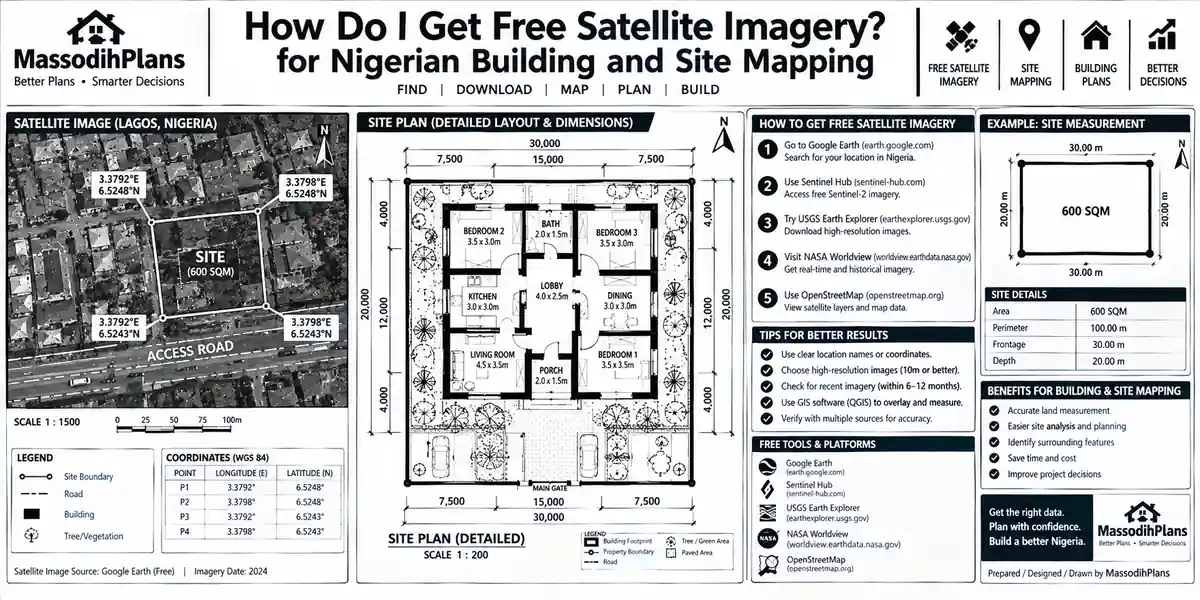
How Do I Get Free Satellite Imagery? for Nigerian Building and Site Mapping
A client once sent me coordinates for a “prime waterfront plot” he was about to pay for, fully online, without ever setting foot on the land. Before I replied with any planning advice, I pulled up free satellite imagery of the exact coordinates. The “waterfront plot” was sitting inside a flood-prone wetland that gets submerged every rainy season. He had almost paid millions of naira for land that, going by three years of satellite images, spends four months underwater annually.
That’s the real reason I’m writing this guide. Not because satellite imagery is trendy I’m genuinely not chasing trends but because as someone trained in Geography, Urban and Regional Planning, and GIS, I use free satellite imagery constantly in real planning and land-verification work, and almost everything written about “how to get free satellite imagery” online treats it as a hobbyist curiosity instead of the serious due-diligence and planning tool it actually is. Let’s fix that.
What “Free Satellite Imagery” Actually Means (And What It Doesn’t)
Before we go anywhere, let’s clear up a confusion that trips up almost everyone searching this topic. “Free satellite imagery” does not mean Google-Earth-style zoomed-in street detail where you can count roof tiles. That level of detail comes from commercial providers (Maxar, Planet, Airbus) and typically costs money, sometimes a lot of it.
What’s genuinely free is government and space-agency-operated satellite data mainly from the Landsat program (USGS/NASA) and the Sentinel program (European Space Agency’s Copernicus initiative) at resolutions ranging from 10 metres to 30 metres per pixel. That’s not “see your car in the driveway” detail. It is, however, more than enough to assess land use, vegetation health, flood risk, water bodies, soil exposure, urban expansion, and land cover change over time which, for planning, agriculture, land verification, and research purposes, is exactly what you need.
So the honest answer to “how do I get free satellite imagery” has two parts: which platforms give it to you for free, and what you can actually and reasonably do with what you get. This guide covers both, because a list of download links without that second part is only half a useful answer and that’s precisely the half most articles on this topic stop at.
If someone online offers you “free high-resolution satellite imagery” of a specific private address at sub-metre detail, be skeptical. That level of detail is commercial-grade and rarely free. What’s genuinely free is medium-resolution data still powerful, just not spy-movie powerful.
Why You’d Want Free Satellite Imagery in the First Place
Let’s be practical before we get technical. Here’s who actually needs this, and why:
Land buyers and diaspora investors verifying a plot’s real condition flooding history, vegetation, erosion, encroachment before wiring money for land they haven’t physically inspected
Architects, planners, and surveyors assessing a site’s topography, drainage pattern, and surrounding land use before design begins
Farmers and agricultural planners monitoring crop health and soil moisture across a growing season
Students and researchers studying land cover change, urban sprawl, or environmental monitoring for academic work
Journalists and NGOs verifying claims about deforestation, flooding, or conflict-affected areas using independent, trustworthy imagery
Disaster response teams assessing flood extent, wildfire spread, or storm damage within hours of an event
Notice the common thread: almost every one of these use cases is about making a decision with real stakes money, safety, or planning accuracy not just looking at pretty pictures of Earth. Keep that in mind as we go through the platforms, because it’ll shape which one is actually right for your need.
Free Sentinel Imagery: Where to Get It and Why It’s Often Your Best First Stop
The Sentinel satellites are operated under the European Space Agency’s Copernicus program, and for most people searching “free satellite imagery,” this is genuinely the best starting point in 2026 because of how current and how frequently refreshed the data is.
Copernicus Data Space Ecosystem (formerly Copernicus Open Access Hub)
This is the official home of all Sentinel data. The interface has moved to the newer Copernicus Browser, which makes it significantly easier for non-specialists to search, preview, and download imagery for a specific area and date range without needing specialized software just to look at it.
What you get here:
Sentinel-2: optical imagery at 10-metre resolution, revisited every 5 days your go-to for vegetation, land use, water bodies, and general land cover
Sentinel-1: radar (SAR) imagery at around 20-metre resolution crucially, this sees through cloud cover and works at night, which optical satellites simply cannot do
Sentinel-3 and Sentinel-5P: ocean, atmosphere, and air-quality monitoring data, more specialized but still free
How to actually download Sentinel imagery:
- Create a free account on the Copernicus Data Space Ecosystem (email verification only no payment details, no approval wait)
- Use the Browser’s map to navigate to or search your area of interest
- Set your date range and, critically, filter by cloud cover percentage this single filter saves you more frustration than anything else, because a scene with 80% cloud cover is functionally useless for optical analysis
- Preview the available scenes directly in the browser before committing to a download
- Download either the full scene or, where supported, just the specific bands you need, to save time and storage
Before You Build Anything on This: Don’t judge a plot’s flood risk from a single satellite image, however clear it looks. Pull imagery from at least two different seasons ideally one from peak rainy season and one from dry season because a single dry-season image of a swamp can look deceptively solid and buildable.
Free Landsat Imagery: The Longest Memory Satellites Have
If Sentinel is your “what does this look like right now” tool, Landsat is your “what has happened here over time” tool and this distinction is the single most useful thing I can teach you in this entire guide.
The Landsat program, jointly run by NASA and USGS, has been continuously observing Earth since 1972. That’s over five decades of consistent imagery of nearly every square kilometre of land on the planet. No other freely available satellite archive comes close to that historical depth.
USGS EarthExplorer
This is the official portal for the entire Landsat archive, plus aerial photography and a long list of other datasets.
How to download Landsat imagery via EarthExplorer:
- Create a free USGS account
- Define your area of interest by drawing a shape on the map or entering coordinates directly
- Select your dataset under “Landsat,” you’ll see options from Landsat 1 through Landsat 9, each covering different time periods
- Set your acquisition date range and cloud cover threshold
- Review results and add the scenes you want to your download basket
- Download directly, or use the Bulk Download Application if you’re pulling a large number of scenes for a time-series study
Why historical depth matters practically
If you’re verifying land before purchase, pulling Landsat imagery from 10, 20, even 40 years ago for the same coordinates tells you whether that “dry, buildable” plot was a riverbed or wetland decades ago because land reclaimed from water bodies often develops serious long-term structural and drainage problems that a single recent image will never reveal.
For any serious land purchase decision, pull at least three Landsat images spaced 10+ years apart for the exact coordinates, alongside recent Sentinel-2 imagery. If a “dry” plot was visibly water or wetland a decade or two ago, treat that as a structural engineering conversation, not just a planning one.
Na so one of my students wan buy land for one area wey dem call “New Layout” but when we check the old Landsat images, na river dey there since 2008! I tell am say “my brother, na New Layout for name, but na Old River for ground level the water never collect international passport, e go still come back.”
How to Actually Download Satellite Images (Step by Step, No Jargon)
This section exists because almost every “free satellite imagery” article assumes you already know GIS terminology. You probably don’t, and that’s completely fine here’s the process stripped down to what you actually need to know.
Step 1: Know Your Exact Area of Interest
You need either the coordinates (latitude/longitude) of your location, or the ability to visually zoom to it on a map. If you only have a place name or address, look it up on Google Maps first, right-click the exact point, and copy the coordinates shown.
Step 2: Choose Your Platform Based on Your Actual Need
- Need current conditions, updated every few days? → Sentinel via Copernicus Browser
- Need historical comparison over years or decades? → Landsat via USGS EarthExplorer
- Need the easiest possible interface with no account creation for quick viewing? → NASA Worldview or Sentinel Hub’s EO Browser (covered below)
Step 3: Set Your Filters Before You Search
Date range and cloud cover percentage are the two filters that determine whether your download is actually usable. Skipping this step is the single biggest reason beginners download a satellite image and find it’s just a grey wall of cloud.
Step 4: Preview Before You Download
Every major platform lets you preview a scene before downloading. Always do this. A full Sentinel-2 scene can be over 1GB; a full Landsat scene is typically 500MB-1GB. Downloading several of these blind, only to find clouds or the wrong date, wastes real bandwidth and time a genuine concern if you’re in an area with limited or costly data.
Step 5: Download the Right File Format
Most platforms deliver imagery as GeoTIFF files (readable in free software like QGIS) or as a compressed archive containing multiple band files. If you just want to view the image without GIS software, look for a platform offering a direct “true color” or “natural color” preview/export, which most Browser-based tools now provide.
Step 6: Open and View It
For simple viewing, free software like QGIS (completely free, open-source) opens GeoTIFF files directly. For quick band-combination adjustments (to highlight vegetation, water, or bare soil differently), QGIS’s raster tools or the ESA’s free Sentinel toolbox (SNAP) handle this without needing paid software.
Free satellite imagery downloads are often large files in specialized formats. Don’t attempt serious analysis using only your phone a basic laptop with at least 8GB RAM and free software like QGIS will save you considerable frustration, especially for multi-band or time-series work.
Other Legitimate Free Sources Worth Knowing
Beyond the two major programs above, these platforms deserve a mention because each solves a specific problem well:
NASA Worldview: excellent for near-real-time global imagery with zero account creation needed ideal for quickly checking current conditions like wildfire smoke, storm systems, or flood extent
Sentinel Hub EO Browser: a polished, fast interface for viewing and lightly processing Sentinel and Landsat data side by side, with a generous free tier
Google Earth Engine: a cloud-based platform for more advanced users who want to run analysis across huge datasets without downloading everything locally free for research, education, and nonprofit use, with commercial terms for business use
NASA Earthdata: the broader catalog behind many specialized Earth science datasets beyond just Landsat
Esri Living Atlas: curated, ready-to-use imagery layers, useful if you want something more immediately visual without heavy processing
National/regional portals: many countries now run their own free portals (India’s Bhuvan is a well-known example) worth checking if your area of interest has strong local coverage needs
Using Free Satellite Imagery to Verify Land Before You Buy (The Layer No Other Article Covers)
This is, as far as I can tell from reviewing what currently ranks for this topic, something genuinely missing from the existing “free satellite imagery” content online because most of it is written for GIS hobbyists and researchers, not for the person about to commit life savings to a plot of land, which is exactly who a large part of my audience actually is.
Here’s a practical land-verification routine using only free satellite imagery:
Pull the most recent cloud-free Sentinel-2 image of the exact coordinates and check current land cover is it visibly dry, vegetated, bare, or does it show standing water?
Pull a rainy-season image from the same recent year and compare does the same spot show water or waterlogging that the dry-season image hid?
Pull Landsat imagery from 10, 20, and 30 years back at the same coordinates to check the land’s history was it previously a water body, wetland, or forest that’s since been filled or cleared?
Check surrounding land use, not just the plot itself is it isolated in genuine bushland far from any access road or existing development, despite being marketed as “developing residential area”?
Cross-reference with Sentinel-1 radar data where optical imagery is cloud-obstructed, since radar sees through cloud cover and can still reveal standing water or saturated ground that optical images miss entirely
None of this replaces an actual site visit, survey plan verification, or title search and I will say that plainly rather than oversell what satellite imagery can do. But as a first screening step, especially for diaspora buyers who cannot easily visit in person, this routine has already saved at least one client (the one I mentioned at the start) from a very expensive mistake.
Satellite imagery is a screening tool, not a legal verification tool. Use it to decide whether a plot deserves a proper physical inspection and survey never as a replacement for one.
Practical Uses Beyond Land Verification
Because the search intent behind “free satellite imagery” genuinely spans several different audiences, here’s how the same data serves other purposes:
For site planning and architecture: satellite imagery reveals a site’s surrounding context existing buildings, access roads, drainage channels, and vegetation patterns that should inform orientation, setbacks, and drainage design, long before a single architectural line is drawn.
For agriculture: time-series Sentinel-2 imagery lets you track vegetation health (using indices like NDVI, which most free tools calculate automatically) across a growing season, spotting stressed crop areas before they’re visible to the naked eye on the ground.
For environmental monitoring: comparing Landsat imagery across decades is the standard method researchers use to document deforestation, urban sprawl, coastline erosion, or wetland loss all without needing to physically survey vast areas.
For disaster assessment: both NASA Worldview and the Copernicus Browser are updated quickly enough after major events (floods, wildfires, storms) to support near-real-time damage assessment, which is genuinely valuable for NGOs and local authorities working with limited budgets.
Moving from “where do I get this data” to “what do I actually do with it” is the difference between browsing satellite images and using them and that transition is really the whole point of this guide.
A Global Note: Free Satellite Imagery Works the Same Way Everywhere
One thing worth being direct about: unlike building codes or land registration, which differ wildly country to country, Sentinel and Landsat coverage is genuinely global and free for everyone whether you’re checking a plot in Lagos, a farm in rural Germany, a coastline in Iceland, a development site in Dubai, an agricultural block in Australia’s outback, or a construction lot in Toronto. The same Copernicus Browser and USGS EarthExplorer accounts work identically whether you’re in the US, UK, Switzerland, Luxembourg, Qatar, Singapore, or anywhere else with an internet connection. The only real variable across countries is local cloud cover frequency (equatorial and tropical regions, including most of Nigeria, deal with more persistent cloud cover than, say, Iceland or the UAE, which affects how often you’ll actually get a clean optical image) and, for radar data via Sentinel-1, no such limitation applies regardless of your location’s weather.
Common Mistakes People Make When Getting Free Satellite Imagery
- Ignoring cloud cover filters and downloading unusable, cloud-obscured scenes
- Relying on a single image for a decision that deserves seasonal or historical comparison
- Confusing resolution expectations expecting Google-Earth-level street detail from free medium-resolution data
- Downloading the wrong file type for their intended software, then assuming the platform is broken
- Skipping the account creation step and assuming imagery requires payment, when a free account unlocks full access
- Treating satellite imagery as a legal substitute for a proper survey or title search when buying land
If a “free satellite imagery” website asks for payment details, a credit card, or a subscription before showing you anything, you’re likely not on an official government or space-agency portal. The legitimate sources covered in this guide require, at most, a free email-verified account.
Frequently Asked Questions
Is Sentinel or Landsat better for free satellite imagery?
Neither is universally “better” Sentinel-2 gives you more frequent, higher-resolution current imagery (10m, every 5 days), while Landsat gives you unmatched historical depth back to 1972. Most serious use cases benefit from combining both.
How do I download satellite images of my exact house or plot?
Use the coordinates of your location in the Copernicus Browser or USGS EarthExplorer, draw a small area of interest around that point, and filter for the most recent cloud-free scene. Remember that free imagery resolution (10-30m) won’t show individual houses in fine detail it shows land cover and context around them.
Do I need to pay anything for Sentinel or Landsat imagery?
No. Both are entirely free, funded by government and space agencies, and require only a free account with email verification no credit card, no subscription, no hidden paywall.
Can free satellite imagery replace a physical site visit before buying land?
No. It’s an excellent first screening tool to catch obvious red flags (flooding history, wetland reclamation, isolation from development) remotely, but it should always be followed by a physical inspection, survey verification, and proper title search before any purchase decision.
What software do I need to open satellite imagery files?
Free, open-source QGIS handles GeoTIFF files from both Sentinel and Landsat without any cost. For Sentinel-specific processing, ESA’s free SNAP toolbox is purpose-built for the job.
Why does my downloaded satellite image look mostly grey or white?
That’s cloud cover. Go back to your search filters and set a lower cloud cover percentage threshold, then pick a different date within your range.
One of my clients messaged me, “Massodih, I don try download this satellite image since morning, e dey show me cloud-cloud, no land for inside at all!” I just laugh and tell am say “my brother, na the atmosphere dey show you say make you adjust your cloud filter even satellite sabi say rain no gree person see road for Naija sometimes.”
Finally
Free satellite imagery is one of the most underused tools available to anyone planning a building, verifying land, monitoring a farm, or researching environmental change and the biggest gap in how it’s usually explained online isn’t the list of download links, it’s the missing bridge between “here’s where to get it” and “here’s what you actually do with it once you have it.” Sentinel gives you current, frequent eyes on the ground; Landsat gives you decades of memory; and together, used properly, they can catch problems a flood-prone plot, a reclaimed wetland, a stressed crop field long before they become expensive mistakes on the ground.
If satellite imagery analysis is pointing you toward a site that needs proper planning before you build, our Services page outlines how we support clients from site assessment through to approved building plans. Browse our Plans Library for designs already adapted to real site conditions, or visit Plan School to understand the planning and approval process once your land is confirmed suitable. You can also explore more practical planning guides on our Homepage.
My friend, that one person wey almost buy “New Layout” that turn out to be old river still dey thank me till today he always tell me say “Massodih, you don save my money pass my own village church offering.” Anyway, if you get any plot wey you wan verify, you sef fit try this process before you carry your hard-earned money commit am.
Related Articles
- How Do I Fix the Coordinate System? GIS Layer Alignment for Site Plans Fast
- Why Are My GIS Layers Not Aligning? — GIS Fixes for Building Site Plan Maps
- Why Is My GIS Map Not Showing Correctly? (Real Fixes That Actually Work)
- How to Improve Construction Site Communication: Avoid Delays and Rework Now
- How to Manage Construction Documents Properly for Nigerian Construction Sites
Author
Massodih Okon is a Nigerian built-environment professional with academic and professional experience in urban and regional planning, geography, architectural design, Landscape Design, GIS and land development.
He holds a Master’s degree in Urban and Regional Planning from the University of Uyo and a first degree in Geography and Regional Planning.
Through MassodihPlans, he publishes practical guides on Nigerian house plans, building design, physical planning, site planning, development approval and residential construction. Read the full author profile →